LoomBoard v0.1.2 ships: a desktop chat app for loomcycle.
Nine days ago I wrote a field report about upgrading my TrueNAS box into an inference server. The last section was called "and the frontend I had to build." I tried Open WebUI for two days, uninstalled it, and started writing what I actually wanted. That chat surface ships today.
LoomBoard v0.1.2 is a native desktop chat app for the loomcycle agentic runtime. Same React codebase powers a Tauri v2 desktop application for macOS, Windows, and Linux; an npm CLI that runs the same UI in your browser with a small local proxy; an embeddable React component for hosts that want the chat inside their own app; and a Chrome side-panel extension that lets the agent read and act on any page you have open. Four packagings on one codebase. Apache-2.0. Free download.
Download
macOS DMG (16 MB) Windows installer (6 MB) Linux AppImage (86 MB)
All install paths, screenshots, and verification commands on the LoomBoard product page.
The short version. LoomBoard is a thin client. It talks to a loomcycle runtime over the standard /v1/* HTTP + SSE wire; the runtime owns auth, persistence, tools, and the agent loop. LoomBoard's job is one conversation at a time, well rendered, with streamed tool calls, reasoning traces, live token / throughput / context HUD, human-in-the-loop Interruption answers, image + PDF + DOCX attachments, an embedded Skills + MCP catalog (via @loomcycle/library), and inline budget warnings when RFC AW's EventLimit fires. Ships as: Tauri v2 desktop (macOS universal DMG, Windows NSIS + MSI, Linux AppImage + deb, all unsigned for v0.1.x); @loomboard/app (npm-installable CLI that opens the same UI in your default browser and reverse-proxies /v1/* to your loomcycle, sidestepping browser CORS); @loomboard/chat (embeddable React component with peer deps react, react-dom, @loomcycle/client); and a Chrome side-panel extension that registers browser_read_page / fill / click / navigate as RFC BC client-executed tools so the agent can actuate on any page you have open. Chrome Web Store submission queued after v0.2 signing.
Why a separate app
Loomcycle already has a Web UI. It's fine. The Web UI's job is operator work: managing Agents, Skills, MCP servers, Path/Documents, Routing, Usage, Limits, audit logs. It's the tenant-operator surface I've been iterating on since RFC AS (v1.6.3-v1.6.7). It's dense. Every square inch is a substrate concern.
The chat use case wants something different. When I want to converse with an agent about local pull requests, or ask it to summarize a doc, or send a nightly digest to Telegram, the Web UI's density gets in the way. I want a chat surface. Big message list, streamed tool calls rendered inline, one conversation at a time, the substrate available but not the whole substrate. That's what LoomBoard is.
The thin-client architecture is deliberate. LoomBoard has no server of its own. No database. No auth layer. No message queue. The bearer token you paste into the connection screen goes into the browser's local storage; on the desktop, into the Tauri window's local storage; the CLI proxy forwards it upstream but never reads or logs it. Every conversation, every transcript, every tool invocation is persisted by the loomcycle runtime. If you reinstall LoomBoard, if you switch from the desktop to the CLI to the Chrome extension, if you use LoomBoard from your laptop and the Web UI from your phone: the same loomcycle serves you, the conversation continues.
This is what "user-facing surface for loomcycle" means concretely. LoomBoard isn't an AI chat app; it's the chat surface for your loomcycle. Different loomcycle, different chat. Same loomcycle from anywhere, same chat.
Four packagings
Native desktop (Tauri v2)
A macOS universal DMG (Apple Silicon + Intel), a Windows NSIS installer and MSI, and a Linux AppImage and deb. All unsigned for v0.1.x, which means first-launch friction: macOS Gatekeeper shows "cannot be opened because the developer cannot be verified" and you right-click the app and pick Open; Windows SmartScreen shows "Windows protected your PC" and you click "More info" then "Run anyway"; Linux is standard AppImage or deb. Signed builds arrive with v0.2 (Apple Developer ID + Windows code-signing certificate). Documented on the download page in plain language, not as fine print.
The Tauri v2 wrapper hosts the React SPA in a native window. It uses Tauri's HTTP plugin for the loomcycle wire so cross-origin doesn't matter: the frontend calls tauri://loomcycle.example and Tauri's Rust process makes the actual HTTP request, sidestepping the browser's CORS enforcement. The advantage over an Electron equivalent is size and startup: the DMG is 16 MB and cold-start is under a second on my 2018 MacBook Pro. No Chromium bundled; the app uses each platform's system WebView (WKWebView on macOS, WebView2 on Windows, WebKitGTK on Linux).
Node CLI (@loomboard/app)
A one-line install for anyone who has Node ≥ 18:
npm install -g @loomboard/app
loomboard
# opens http://127.0.0.1:4173 in your default browser
The CLI starts a tiny local HTTP server on 127.0.0.1:4173, serves the same SPA the desktop app uses, and reverse-proxies /v1/* to whatever loomcycle URL you point it at. The reverse-proxy is the point: browsers can't call a remote loomcycle cross-origin because loomcycle sends no CORS headers by design, and the proxy makes that a non-issue. Bearer tokens live in the browser's local storage; the CLI process only forwards them, never reads or logs them.
Options: --port to change the local port, --host to bind to a non-loopback address (default is 127.0.0.1 so it's not exposed on your network), --loomcycle <url> to preset the loomcycle target, --insecure to skip TLS verification for self-signed LAN certs, --no-open to skip opening the browser. Cross-platform (Linux, macOS, Windows, anywhere Node runs). Useful for people who don't want a desktop install or for machines that don't have a GUI.
Embeddable React component (@loomboard/chat)
An npm-installable React component for hosts that want the chat inside their own app:
npm install @loomboard/chat
// paraphrased usage
import { Chat } from "@loomboard/chat";
import "@loomboard/chat/styles.css";

<Chat
  connection={{ baseUrl: "https://your-loomcycle.example", token: "..." }}
  conversation={{ id: "c1", title: "New chat", baseAgent: "chat", config: {} }}
  onConversationChange={(patch) => setState({ ...state, ...patch })}
/>
Controlled component: the host passes the conversation record and persists the patches it emits (session/run ids, title, agent, config). Peer deps react, react-dom, @loomcycle/client. Styles scoped under a .loomchat class so they don't leak into your app. Light and dark theme via a theme prop or the ambient data-theme attribute.
This packaging is the one that answers "how do I put a chat inside my own SaaS product without becoming an agent-framework maintainer." Peer @loomcycle/client, drop in the component, connect it to your runtime. LoomBoard's own repo doubles as the demo app that consumes the component, so you can see exactly how it composes.
Chrome side-panel extension
An MV3 extension that runs the chat in Chrome's side panel plus a content script that reads and actuates on the active tab. Not yet on the Chrome Web Store; ships as a "Load unpacked" zip for now.
curl -LO https://github.com/denn-gubsky/loomboard/releases/download/v0.1.2/loomboard-extension-0.1.10.zip
unzip loomboard-extension-0.1.10.zip -d loomboard-extension
# chrome://extensions → Developer mode → Load unpacked → loomboard-extension/
The extension side panel opens a WebSocket to your loomcycle and registers four client-executed tools: browser_read_page (returns visible text and semantic structure of the active tab), fill (fills a form field by CSS selector), click (clicks an element), and navigate (navigates the active tab). The agent invokes these as if they were built-in tools; the loomcycle runtime routes each invoke to the connected browser; the content script executes in the tab and returns the result. This is RFC BC client-executed tools, shipped in loomcycle v1.16.0 alongside the extension migration.
Actuation is gated. A Confirm-vs-Auto toggle sits at the top of the side panel. In Confirm mode (the default), every fill / click / navigate raises an approval bar; you click through each. In Auto mode, actions run immediately (with a Stop button to dismiss a pending one). Sensitive fields (passwords, credit-card fields, anything HTML-tagged as sensitive) always require confirmation regardless of mode. This is the security posture I want for a browser assistant that runs on <all_urls>. Not "the agent has your browser"; "the agent has your browser, with your explicit permission per action, and it can't touch sensitive fields without you saying yes."
Requires loomcycle ≥ v1.16.0 for the client-executed-tools transport. Chrome Web Store submission is queued after v0.2 (needs signed extension assets and a privacy review).
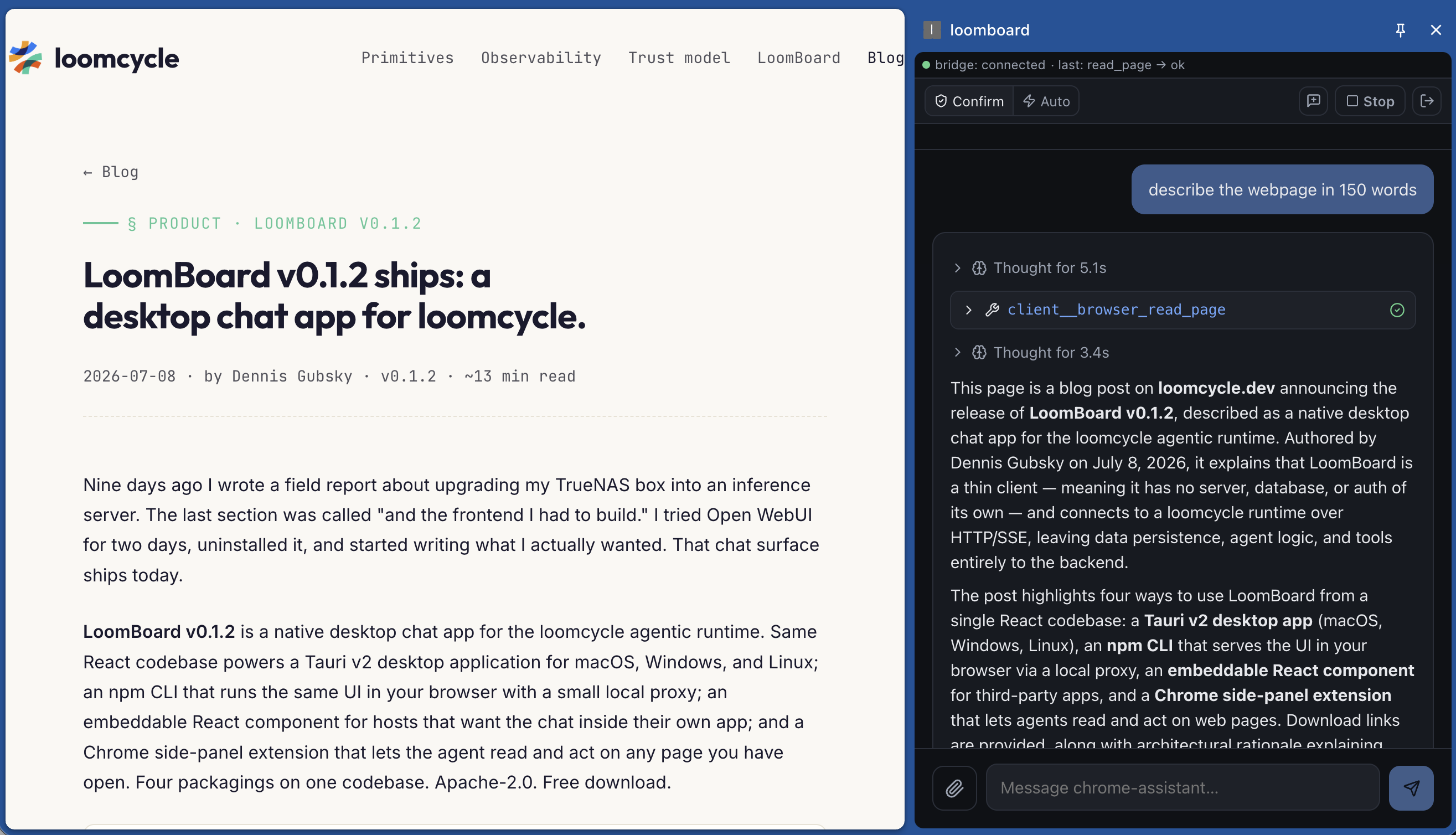
client__browser_read_page. Bridge status renders live in the extension's header; the tool call renders in the transcript like any other tool.The demo: local qwen3.6 scans a market
This is the shape end-to-end. A locally-hosted qwen3.6:latest running on the same TrueNAS box that runs the loomcycle runtime. LoomBoard's Chrome extension pinned to Chrome's side panel on my laptop. I open the Romanian e-commerce site EMAG.RO on a Noctua NF-A9x14 fan product page. The extension reads the page (extract the product name, price, technical specs), then does a market scan: is this fan cheaper elsewhere?
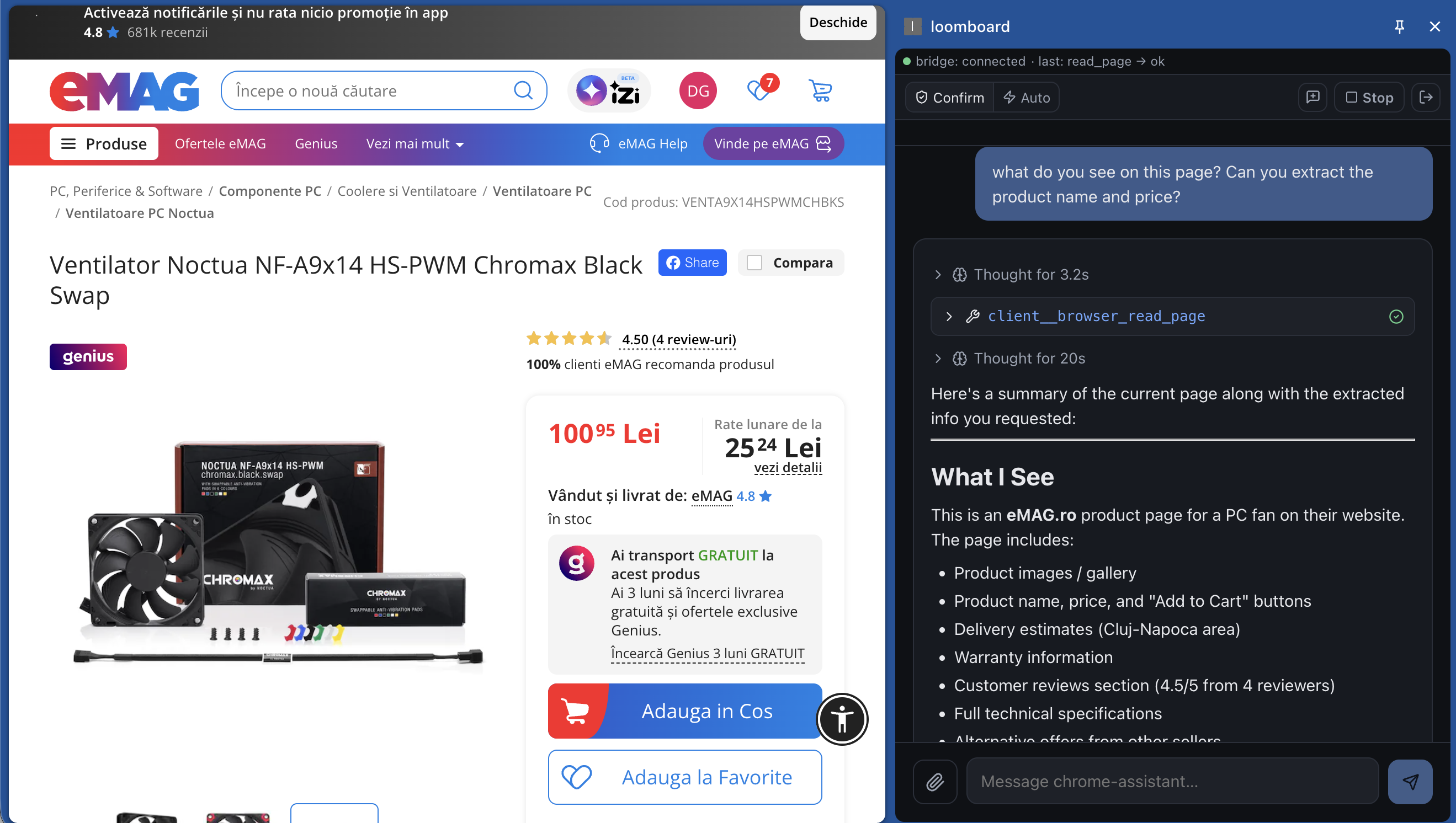
client__browser_read_page tool as before, applied to a real product page in a non-English language. The agent surfaces the load-bearing fields as bullets, ready to be composed with the WebSearch fallback circuit.
Two things stand out watching this. The first is the reasoning trace mid-run: the agent notices that a suspicious product code (VENTA9X14...) doesn't match Noctua's usual SKU pattern, converts the price to USD and EUR to check against a mental baseline, and flags "this is too cheap for an original Noctua; either it's a knockoff or the eMAG listing has a real problem." That reasoning is emitted by the model as it works; LoomBoard renders it inline as an EventThinking stream event (RFC AT, v1.7-v1.8), styled distinctly from the main response text.
The second is that everything is local. The model runs on Ollama on the TrueNAS box (see the field report on getting qwen3.6 to run on a 780M iGPU). The runtime is loomcycle on the same box. The browser is my laptop's Chrome. The WebSearch fallback circuit (RFC BB) tries the tenant's configured providers in order for the price-comparison query. No cloud LLM was called; no external hosted service is in the loop except the search providers, and even those can be swapped for a self-hosted SearXNG if a homelab operator wants zero external egress.
What's inside the chat
Six shipped capabilities. Every one is in v0.1.2 today, not roadmap:
Streamed output with tool calls + reasoning traces. Watch the agent think, call tools, read results, and respond. Reasoning traces flow inline from every provider that emits them: Anthropic thinking, OpenAI o-series, DeepSeek reasoner, Ollama think:true, Gemini thinking. Backed by loomcycle's EventThinking stream, which was silently dropped by the loop for months before the v1.8.2 fix; every provider's reasoning is now legible.
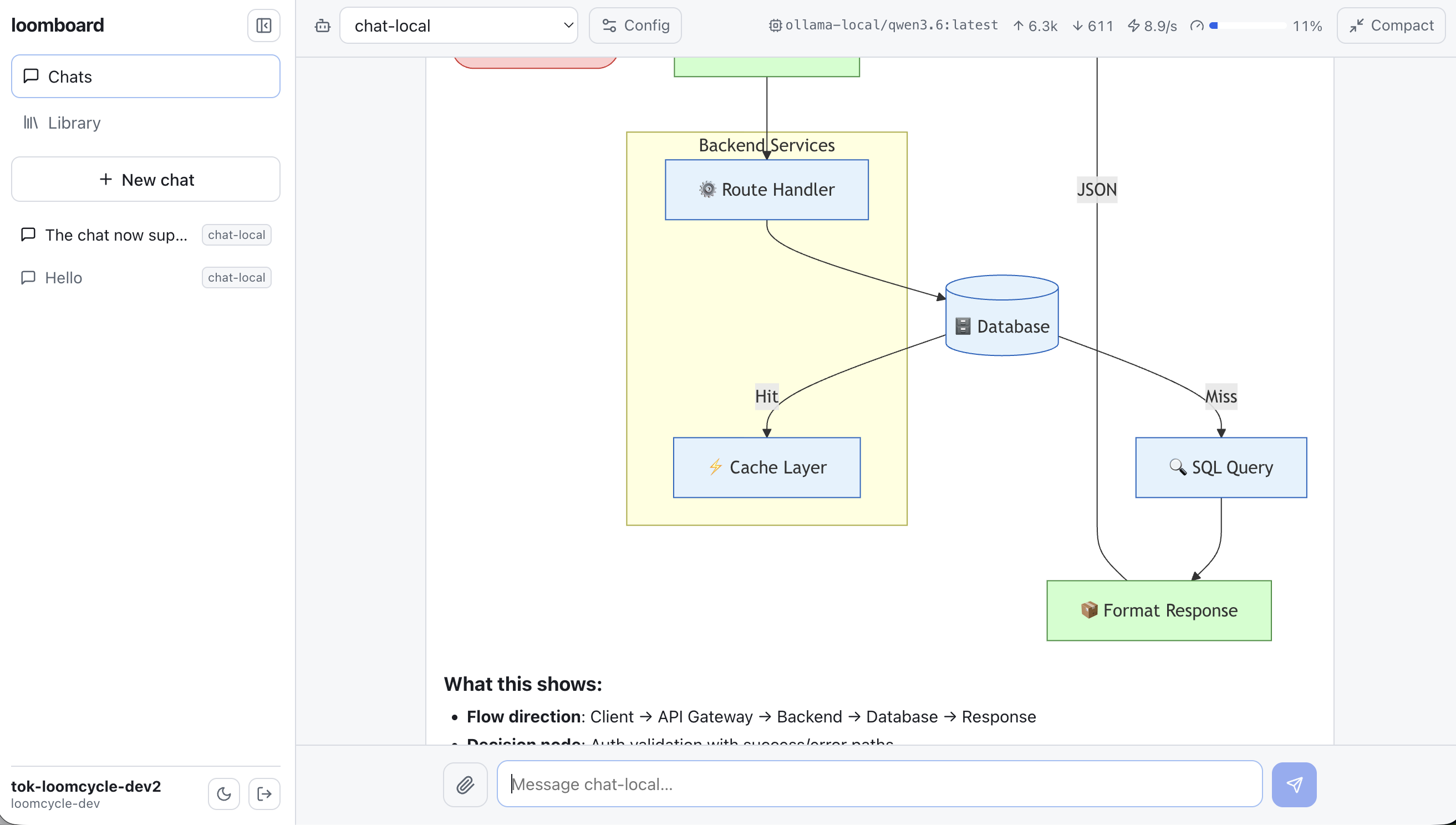
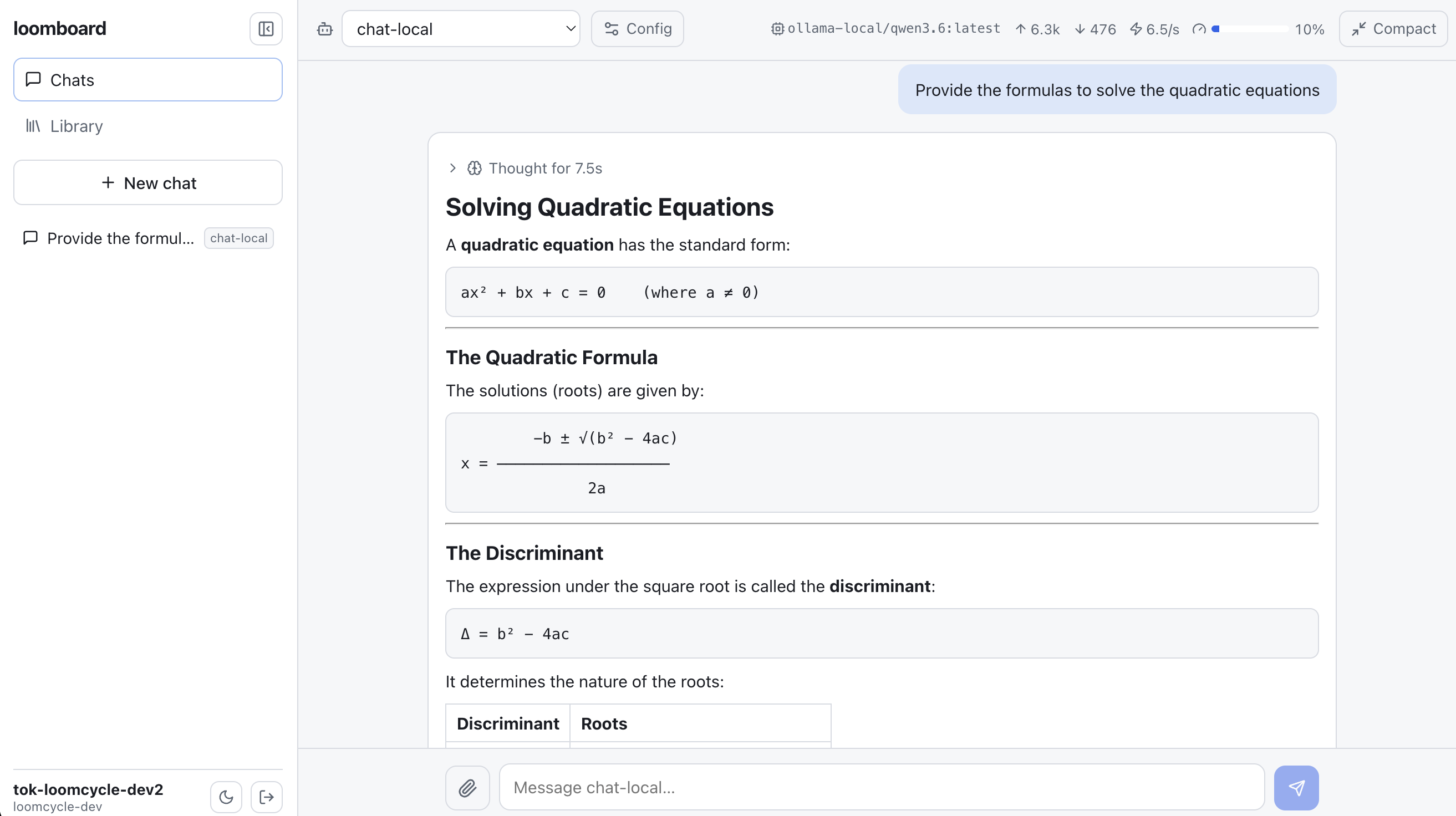
Live token, throughput, and context HUD. A compact heads-up display shows tokens in / out, tokens per second, and how close the conversation is to the context-window ceiling. Context compaction is one click away when the window fills. Manual compaction also works from a keyboard shortcut.
Human-in-the-loop Interruption answers. When the agent asks a question mid-run via loomcycle's Interruption tool, the answer field appears in place. No modal, no thread break, no context switch. Type the answer, submit, the agent resumes with the answer in the transcript. Sub-second round-trip on a local network.
Image, PDF, DOCX attachments. Drop an image directly into the composer for vision-capable providers (Anthropic, OpenAI, Gemini, and Ollama vision models via llava, llama3.2-vision, etc.). Drop a PDF and the client extracts the text via pdfjs-dist before sending; drop a DOCX and mammoth does the same. Big files stay in the browser; the runtime sees text, not binary.
Embedded Skills + MCP catalog. The left rail hosts the loomcycle Library: on-demand Skills (RFC BA), registered MCP servers, and forkable AgentDefs, all rendered by the reusable @loomcycle/library React component (RFC AY). The same CRUD surface the loomcycle Web UI exposes, available inside the chat. Add a skill, fork an agent, register a new MCP server, without switching tabs.
Inline budget warnings. Per-scope token budget warnings (RFC AW) surface inline in the transcript: amber banner when a soft threshold crosses, red when the hard cap denies the next run. The runtime does the enforcement; LoomBoard renders it as an inline event alongside text and tool calls. Nothing about spend is invisible.
How LoomBoard composes with loomcycle
LoomBoard reuses primitives that shipped in loomcycle over the last three months without adding anything to the runtime. Every capability listed above is a rendering of a loomcycle event or a call against a loomcycle wire endpoint. No LoomBoard-side auth. No LoomBoard-side database. No LoomBoard-specific API. Any client that speaks the same wire is a peer.
Authentication: loomcycle's OperatorTokenDef (RFC L, v1.0). LoomBoard is a thin client that presents a bearer; loomcycle resolves it to a (tenant, subject) and enforces scope. The desktop app's bearer sits in local storage; the extension's bearer sits in chrome.storage.local; both are handled by the runtime's existing auth layer.
Sessions and transcripts: loomcycle's interactive sessions (RFC AI). LoomBoard opens a session, streams events via SSE, and steers with the standard Steer op. Reopening a chat with a stored session_id replays the transcript from the runtime. Nothing about the conversation lives client-side beyond a pointer.
Reasoning traces: EventThinking from every provider (v1.8.2 fixed the loop drop; before that, only inline reasoning was visible).
Budget signals: EventLimit from RFC AW (v1.11.0). The runtime emits it on soft-threshold and hard-cap crossings; LoomBoard renders it inline.
Library: the reusable @loomcycle/library React component (RFC AY, v1.13.1). The loomcycle Web UI's own Library view is a thin wrapper (569 → 64 lines when it started dogfooding the extracted package); LoomBoard embeds the same component in its left rail with a different chrome. Skills and MCP servers registered by the operator are visible.
Extension actuation: RFC BC client-executed tools (v1.16.0). The Chrome extension registers its browser tools over a WebSocket; the loomcycle runtime routes agent invokes to the registered client. The migration from a channel-based bridge to RFC BC landed the same day the runtime primitive landed.
Everything else, the runtime already had. Which is the whole point.
What's next
v0.1.x is the first useful release. Rough edges are real (see the download-page notes on Gatekeeper and SmartScreen). The next window covers:
v0.2 signed builds. Apple Developer ID for macOS signed DMGs and Windows code-signing certificate for signed installers. Removes the first-launch friction. Same download page, same file names, no user workflow change other than a smoother install.
v0.3 Board mode. The name LoomBoard hints at the second surface: a kanban view over chunked-graph Documents (RFC AK) with AgentTeam graphs (RFC AP) driving state transitions. Cards are chunks; columns are chunk states; move a card and the runtime spawns the next agent in the pipeline for that stage. The launch publishing plan I've been running as a Document since April is the first dogfood workload; nothing about the runtime primitives is missing, only the UI.
v0.3 Explorer mode. The Path VFS and chunked-graph Documents rendered as a filesystem tree in the left rail. Uses the reusable @loomcycle/explorer React component (RFC AZ, shipped in loomcycle v1.13.1). Not a file browser: a semantic tree of the runtime's Path + Document surface, with the Document Viewer beside it.
Android + iOS. Tauri mobile is scaffolded; the Android debug suffix is already in tauri.conf.json. Mobile lands when the desktop cadence stabilises (v0.2 or v0.3).
Chrome Web Store submission. The extension zip today is a Load-unpacked artifact. Store submission requires signed assets and a privacy-review pass; queued after v0.2.
The full download page
The LoomBoard product page at loomcycle.dev/loomboard has the download buttons, install verification commands for every path, four screenshots of the shipped surface, the coming-next list, and the security posture for the Chrome extension. Version-specific artifact links point at the v0.1.2 GitHub release. Repo at github.com/denn-gubsky/loomboard. Apache-2.0.
Companion reading: the TrueNAS field report (this project's origin story: "the frontend was the bottleneck once the hardware worked"), RFC BC client-executed tools (the substrate primitive that makes the extension's actuation possible), and RFC BA on-demand Skills (the pattern-allowlist model that the embedded Library surfaces).