macOS
Download DMG
Apple Silicon + Intel · universal build
First launch: right-click the app icon and pick Open. Gatekeeper flags unsigned apps; the right-click bypass is a one-time confirmation.


Talk to your loomcycle agents from anywhere. Open the hosted version in a browser tab, install the native desktop app, drop the React component into your own product, or add the Chrome side panel that reads and acts on the current page.
No LoomBoard backend. The runtime owns auth, persistence, tools, memory, and the agent loop. LoomBoard drives one conversation and speaks loomcycle's /v1/* HTTP + SSE wire.
Sign in and start.
The hosted LoomBoard is live at board.loomcycle.cloud. Get a token from your tenant vault at loomcycle.cloud, click "loomboard →" from your vault, and the chat app opens already-connected. The bearer never touches a URL: postMessage handoff behind the scenes.
§ or download the native desktop app · v0.3.1
First launch: right-click the app icon and pick Open. Gatekeeper flags unsigned apps; the right-click bypass is a one-time confirmation.
First launch: SmartScreen shows "Windows protected your PC." Click More info then Run anyway.
AppImage: chmod +x loomboard_0.3.1_amd64.AppImage && ./loomboard_0.3.1_amd64.AppImage. Needs libwebkit2gtk-4.1.
Cross-platform, no build step. Starts a local server on 127.0.0.1:4173 and reverse-proxies /v1/* to whatever loomcycle you point it at, so a browser talks to any runtime with no CORS setup.
npm install -g @loomboard/app
loomboard
# or one-shot: npx @loomboard/app
Drop <Chat> into your React tree. Peer deps: react, react-dom, @loomcycle/client.
npm install @loomboard/chat
Load unpacked for now (not yet on the Chrome Web Store). Opens the loomboard chat in Chrome's side panel with a chrome-assistant agent that reads and acts on the current page: summarize, collect data, fill fields, click, navigate. Requires loomcycle ≥ v1.16.0 (client-executed tools, RFC BC).
curl -LO https://github.com/denn-gubsky/loomboard/releases/download/v0.3.1/loomboard-extension-0.1.12.zip
unzip loomboard-extension-0.1.12.zip -d loomboard-extension
# Chrome → chrome://extensions → Developer mode → Load unpacked → pick the folder
§ 01 · what it does
Every listed capability works against a live loomcycle today. Nothing described is still in a branch.
Watch the agent think, call tools, read results, and respond. Reasoning traces flow inline from every provider that emits them: Anthropic thinking, OpenAI o-series, DeepSeek reasoner, Ollama think:true, Gemini thinking.
A compact heads-up display shows tokens in and out, tokens per second, and how close the conversation is to the context window ceiling. Context compaction is one click away when the window fills.
When the agent asks a question mid-run via loomcycle's Interruption tool, the answer field appears in place. No modal, no thread break. Sub-second round-trip.
Drop an image directly into the composer for vision-capable providers. Drop a PDF or DOCX and the client extracts the text via pdfjs-dist and mammoth before sending. Big files stay in the browser, not on the runtime.
The left rail hosts loomcycle's Library: on-demand Skills (RFC BA), registered MCP servers, forkable AgentDefs, chunked-graph Documents (RFC AK), and the memory-view console (RFC BV). Same CRUD surface as the loomcycle Web UI, rendered by the reusable @loomcycle/library React component.
Per-scope token budget warnings (RFC AW) surface inline in the transcript: amber banner when a soft threshold crosses, red when the hard cap denies the next run. The runtime enforces; the client renders.
The sidebar tracks every chat with a live-updating miniature (streaming preview, question badge when a run parks awaiting input, activity dot on the active chat). A resolved interruption never resurfaces when a chat reopens; one interactive run per session gets re-attached and steered on reopen.
Sign in with a tenant-minted user token (RFC BX/BY). An isolated token sees only its own data; a member token (RFC CB, loomcycle v1.53.2) reaches the tenant HTTP plane. The client renders both correctly, hiding tenant-only surfaces from isolated tokens.
§ 02 · how it works
LoomBoard is a thin client. The hosted deployment is the same standalone SPA served by a small Node server that reverse-proxies /v1/* to the runtime on the same tailscale netns, so the browser sees same-origin and loomcycle emits no CORS by design. The desktop app is a Tauri v2 window hosting the same React SPA. The npm CLI runner is the SPA served locally with the same proxy shape. The Chrome extension is the SPA in a side panel with page-access content scripts. Same code path, five packaging modes.
None of the packagings holds state that the runtime does not. Bearer tokens live in the browser's local storage (or IndexedDB in the hosted vault); the CLI proxy forwards them upstream but never reads or logs them. Conversations, transcripts, and tool invocations are persisted by the runtime, not by LoomBoard. Reload the client, restart your machine, or switch installs: your conversations follow the loomcycle you connect to.
LoomBoard talks to loomcycle over the standard /v1/* HTTP + SSE wire via @loomcycle/client. Every capability listed above is a client-side rendering of a loomcycle event. There is no LoomBoard-specific API. Any client that speaks the same wire is a peer.
Read the runtime page →
§ 03 · what it looks like
Real screenshots from the shipped build. The token/throughput HUD in each chat frame reads out live: ollama-local/qwen3.6:latest at 6.5-8.9 tokens/s. Local inference, running on my TrueNAS box.
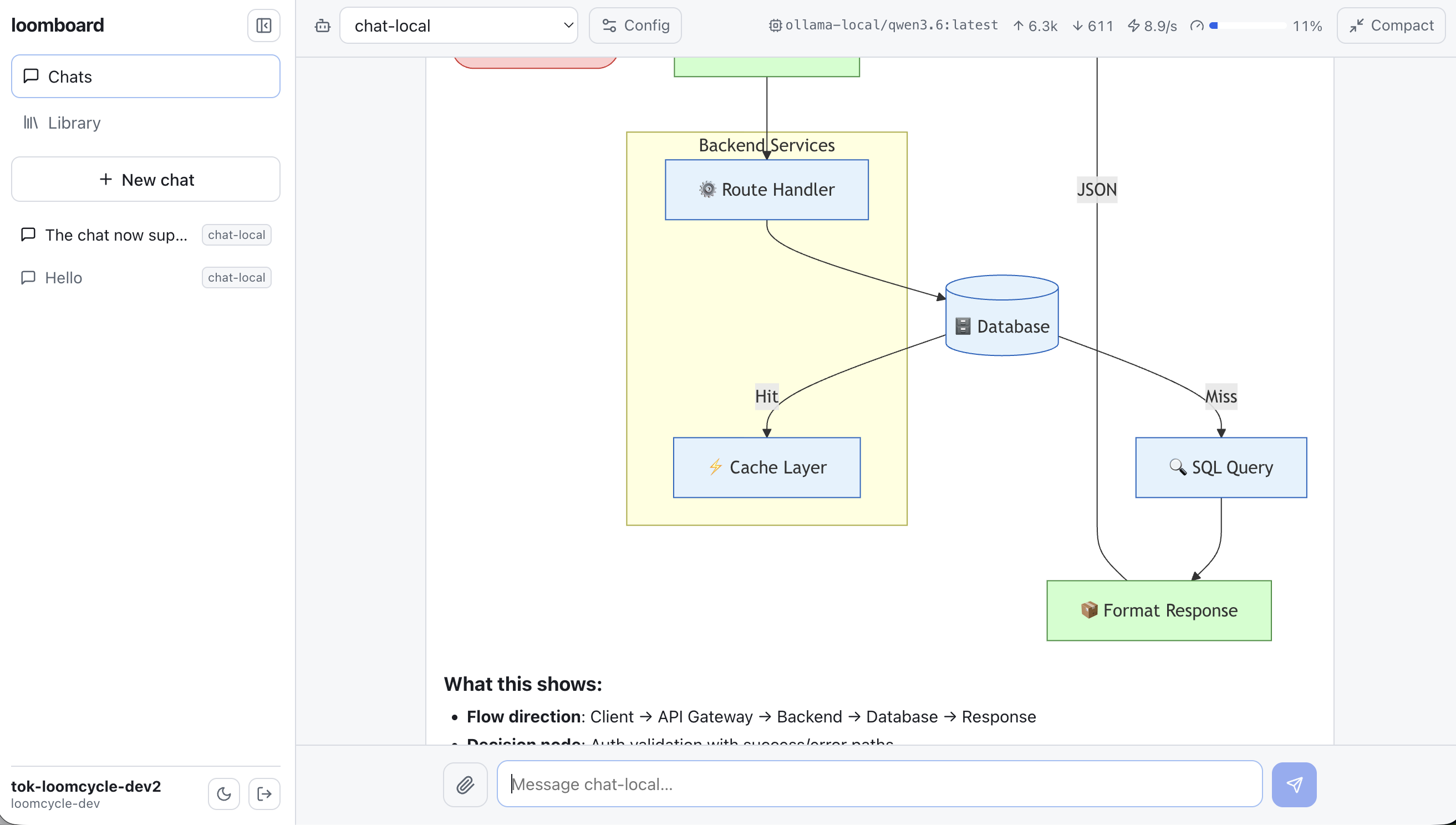
Mermaid diagrams render inline. A local qwen3.6 producing a backend-services architecture diagram, streamed and rendered live.
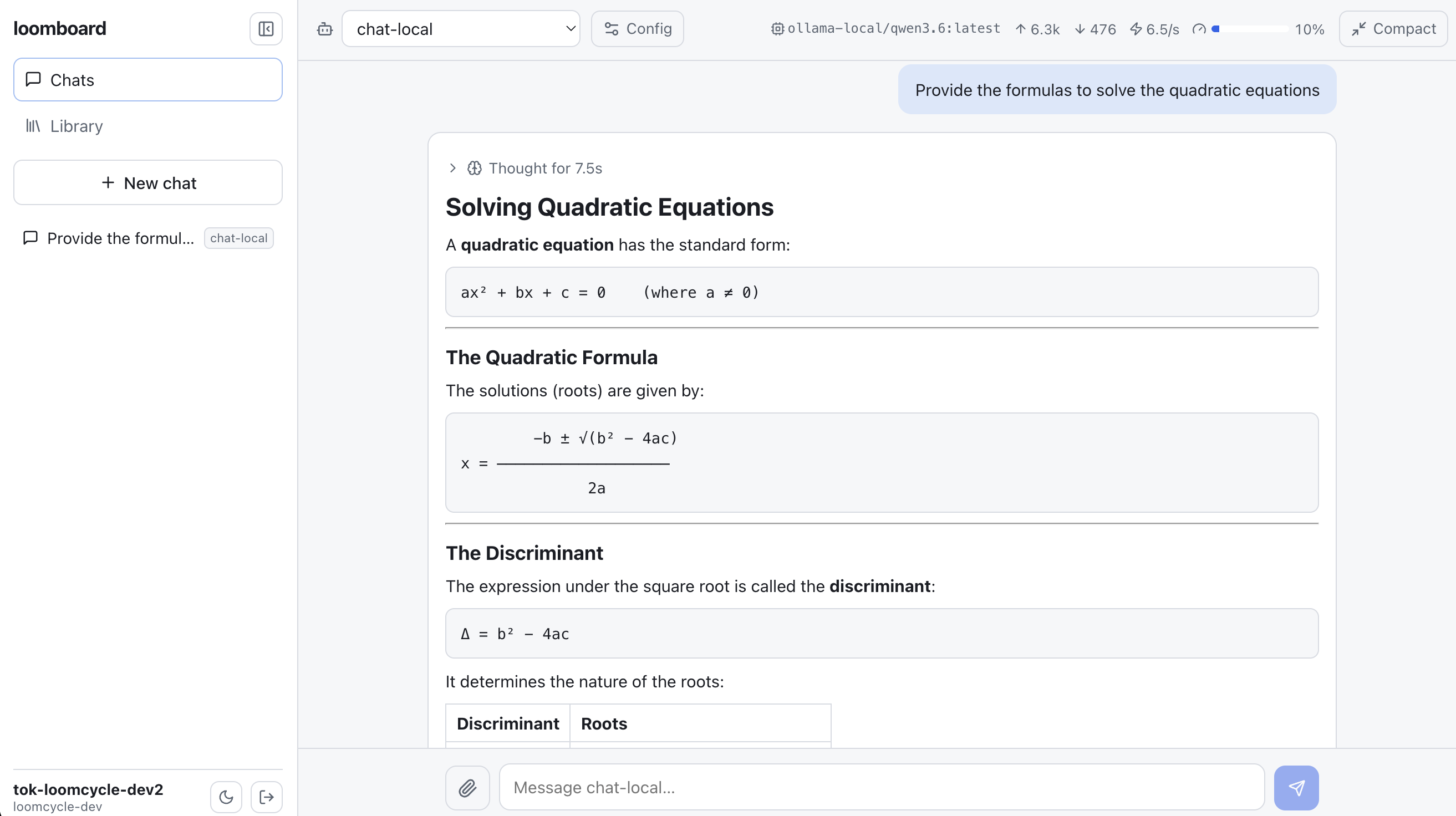
LaTeX math renders inline. The assistant explaining quadratic-equation solutions with formulas rendered from the model's output.
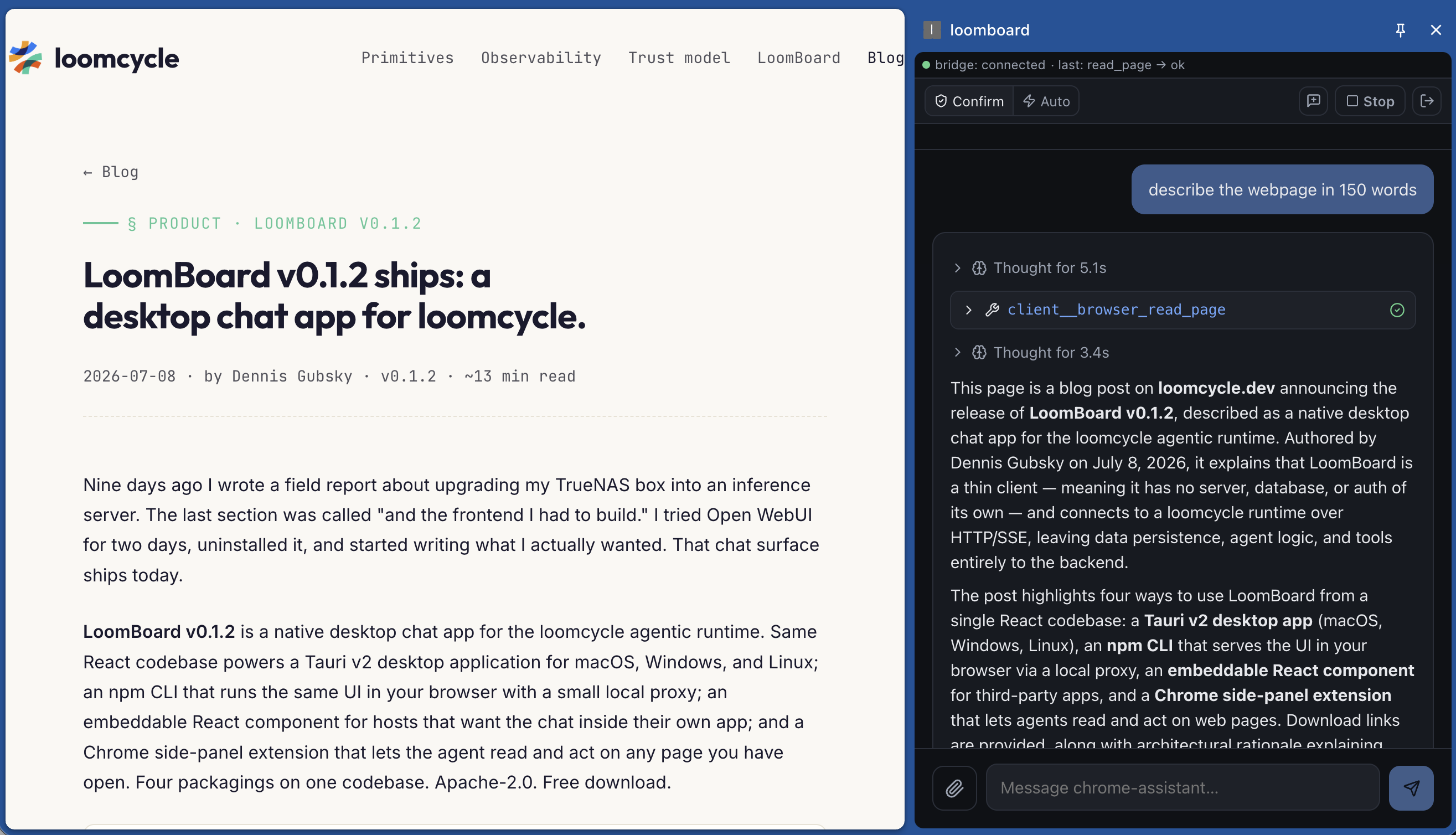
Chrome extension reading a page. The side panel calls client__browser_read_page on the active tab (RFC BC); the agent summarizes without the operator switching tabs.
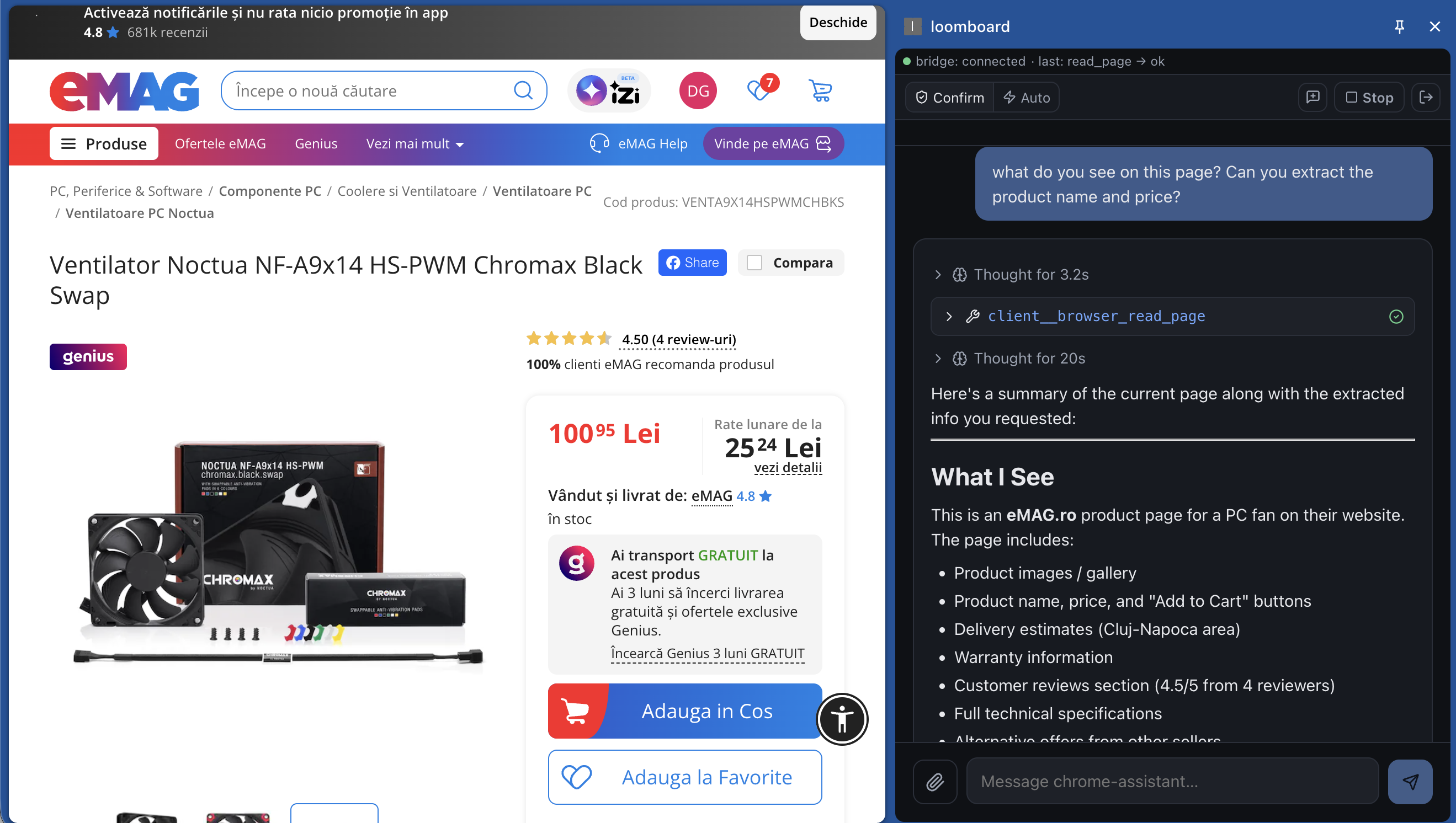
Real-page product extraction. Same tool, applied to a Romanian e-commerce product page. The agent extracts the product name, price, rating, brand, and full technical specs from the DOM.
56 seconds. Locally-hosted qwen3.6 (Ollama) on TrueNAS. The extension reads an EMAG.RO product page, then does a market scan for cheaper alternatives. Reasoning traces streaming, product data extracted from the DOM, web-search fallback circuit walking cascade providers. Not a canned demo, not a hosted-model cloud round-trip. Everything runs on the same box that hosts the loomcycle runtime.
§ 04 · what shipped, what's next
postMessage handoff so a vault or an SSO page can auto-connect the app with a bearer that never touches a URL.
@loomcycle/library, @loomcycle/explorer, and @loomcycle/memory-view React components.
tauri.conf.json. Mobile lands when the desktop cadence stabilises.
§ 05 · install verification
# In a browser, visit:
open https://loomcycle.cloud       # get a token from your tenant vault
# then click "loomboard →" from the vault. Bearer is handed to
# board.loomcycle.cloud via origin-checked postMessage. No URL.
The vault at loomcycle.cloud holds your bearer between visits (AES-GCM under a passphrase). Clicking "loomboard →" opens board.loomcycle.cloud already-connected. The bearer never appears in a URL, in browser history, or in the access log.
curl -LO https://github.com/denn-gubsky/loomboard/releases/download/v0.3.1/loomboard_0.3.1_universal.dmg
open loomboard_0.3.1_universal.dmg
Drag loomboard.app into /Applications. On first launch, right-click the icon and pick Open; Gatekeeper shows the "developer cannot be verified" dialog once. Click Open again. From then on it launches normally.
curl -LO https://github.com/denn-gubsky/loomboard/releases/download/v0.3.1/loomboard_0.3.1_x64-setup.exe
loomboard_0.3.1_x64-setup.exe
SmartScreen: "Windows protected your PC." Click More info, then Run anyway. The installer runs; loomboard is installed to %LOCALAPPDATA%\loomboard by default and gets a Start-menu entry.
curl -LO https://github.com/denn-gubsky/loomboard/releases/download/v0.3.1/loomboard_0.3.1_amd64.AppImage
chmod +x loomboard_0.3.1_amd64.AppImage
./loomboard_0.3.1_amd64.AppImage
Needs libwebkit2gtk-4.1. On Ubuntu 24.04 and Debian 13 it is installed by default. On older distros: sudo apt install libwebkit2gtk-4.1-0.
npm install -g @loomboard/app
loomboard
# opens http://127.0.0.1:4173 in your default browser
The connection screen asks for your loomcycle base URL and bearer token. Leaving the base URL blank routes through the CLI's local /v1/* proxy to http://127.0.0.1:8787 (override with --loomcycle).
curl -LO https://github.com/denn-gubsky/loomboard/releases/download/v0.3.1/loomboard-extension-0.1.12.zip
unzip loomboard-extension-0.1.12.zip -d loomboard-extension
Open chrome://extensions. Toggle Developer mode on. Click Load unpacked and select the loomboard-extension folder. Click the loomboard toolbar icon to open the side panel. Requires loomcycle ≥ v1.16.0 for client-executed tools (RFC BC).