
The Document viewer grows images, diagrams, colors, and edit controls.
1. The gap it closes
You open a document. The tree on the left shows two dozen chunks. The chunk you selected has a table in it; the table renders as raw pipe-delimited text. A Mermaid diagram shows up as a code fence, not a diagram. An image in a chunk is impossible, because no chunk type can hold one. And you wanted to insert a new paragraph three chunks down, so you had to open the raw document tool and pick a position number without a tie.
The store worked. The viewer did not.
The store worked. The viewer did not.
The chunked-graph Document primitive shipped in v1.4.0 as a substrate: a way to store structured knowledge as chunks with types, statuses, hierarchy, and relations, addressable by UUID or by Path. What it did not have, for a long time, was a viewer. You could edit chunk bodies in a text area and save them; you could see a tree of chunks in the left rail; that was it. Tables inside a chunk rendered as raw pipe-delimited text. Diagrams did not render. Images could not exist. A cross-reference edge lived only in SQL. And once a document held twenty or fifty chunks, the manual position math to insert a new chunk in the right place got annoying enough that most people stopped bothering.
Three RFCs closed those gaps across four releases. Not "polish" in the marketing sense; concrete gaps, each with a clear before and after. This post walks them in the order they landed.
The short version. RFC BN (v1.29.0): Save and Cancel pinned to a sticky top bar so long chunk bodies do not need scrolling to save; chunk Markdown renders through react-markdown + remark-gfm with a lazy Mermaid renderer at securityLevel:"strict"; per-document color schemes tint chunk tiles by status and Path-tree rows by type plus status; the settings live in the root chunk's fields so there is zero migration; cross-reference edges become a badge on linked tiles, a clickable list on the selected chunk, and a collapsible whole-document Mermaid relationship graph. Two additive backend ops (documents_summary, get_edges) feed the coloring and the graph without N+1 queries. v1.29.1: a doc-colorizer bundle that runs on the code-js provider (zero tokens, deterministic, idempotent) colors a whole Path subtree in one spawn_run. RFC BO (v1.30.0): image and Mermaid chunks become first-class types. Images are stored as true binary in a new chunk_assets table under an 8 MiB cap; a bearer-authed GET /v1/_document/asset/{chunk_id} serves the bytes with Content-Type from a whitelist (PNG, JPEG, GIF, WebP; no SVG). The viewer renders both; the authoring surface adds an upload button, a paste-a-screenshot handler, a "+ diagram" button, and a live Mermaid-source preview in the editor. export_md renders images as inline data-URLs and Mermaid chunks as fenced blocks; import_md round-trips both. The TS adapter gets fetchDocumentAsset for the authenticated binary GET. RFC BP (v1.31.0): per-chunk edit controls in the viewer. A + text button inserts a new chunk after the selected sibling and opens the editor; ↑ and ↓ reorder within a level; a delete button (danger colored, confirm modal) removes a chunk and selects its parent. Two new backend ops (create_chunk after_id and reorder_chunk) do the position bookkeeping so the viewer never manipulates position numbers by hand. Every change is additive: no schema migration in any of the three RFCs; @loomcycle/client at 1.30.0, Python at 1.25.0, and @loomcycle/explorer at 0.4.0 (versioned independently on explorer-v0.4.0).
2. RFC BN: the viewer becomes a reading surface
The Document store had already grown into loomcycle's primary home for its own RFCs, guides, and research notes: hundreds of chunks across dozens of documents, each with a type and a status, cross-linked to each other. The store worked; the viewer did not. Four phases fix that.
P1: Save and Cancel where you can see them
A small change, but the friction point was real. The chunk-edit dialog placed Save and Cancel at the bottom of the form. A long chunk body pushed them off-screen; you would edit, scroll, save, scroll back. The modal header is now sticky (.modal-header.sticky-top), pinning Save and Cancel at the top of the dialog no matter how long the body gets. The Path-edit dialogs got the same treatment. Web-only; the other modals are unaffected because the pinning is gated behind a modifier class.
P2: full Markdown, including tables and Mermaid
Chunk bodies render through react-markdown plus remark-gfm. GFM tables render as tables. Task lists render as check-marked lists. Strikethrough renders as strikethrough. A ```mermaid fence renders as a diagram via a lazy import("mermaid") with securityLevel:"strict" and bundled DOMPurify.
Two operational details worth naming. First, the Mermaid import is lazy: the ~620 KB chunk loads only on a document that contains a Mermaid fence, kept out of the main bundle. Second, the Vite resolve.dedupe list is set so the SPA bundles exactly one copy of Mermaid, not a second copy alongside the one already used by the teams-board renderer that shipped with agent teams in v1.17.2. Two Mermaid copies in one page is what happens when a shared dep sneaks in by transitive path; the dedupe rule prevents it. On a parse error or on a host that cannot import Mermaid, the renderer degrades gracefully to a code block.
react-markdown is safe by default: no raw HTML, dangerous hrefs stripped. The chunk viewer keeps its no-injection property from the old renderer, so this is a strict upgrade rather than a security regression.
P3: per-document color schemes and Path-tree coloring
This is the change that surprised me most in how much it changed the feel of the viewer. A document can now define a color scheme that tints its chunk tiles by status and its Path-tree rows by type plus status. The tint is a low-alpha wash on the tile plus a full-color left accent stripe; the pattern is the same tinted-tile shape the rest of the UI uses.
The settings live in the document's root chunk fields. An enabled flag, a per-doc.<type>.<status> palette, and a per-chunk.<status> palette. Toggled and edited in the UI. Zero migration: the schema does not change, and a document without a color scheme reads back the zero value and renders as it always did.
A batch action helps here: "copy this palette to all documents of this type" applies the current document's palette to every document of the same type. So if you tune the palette for one RFC, you can push it to every other RFC in one click.
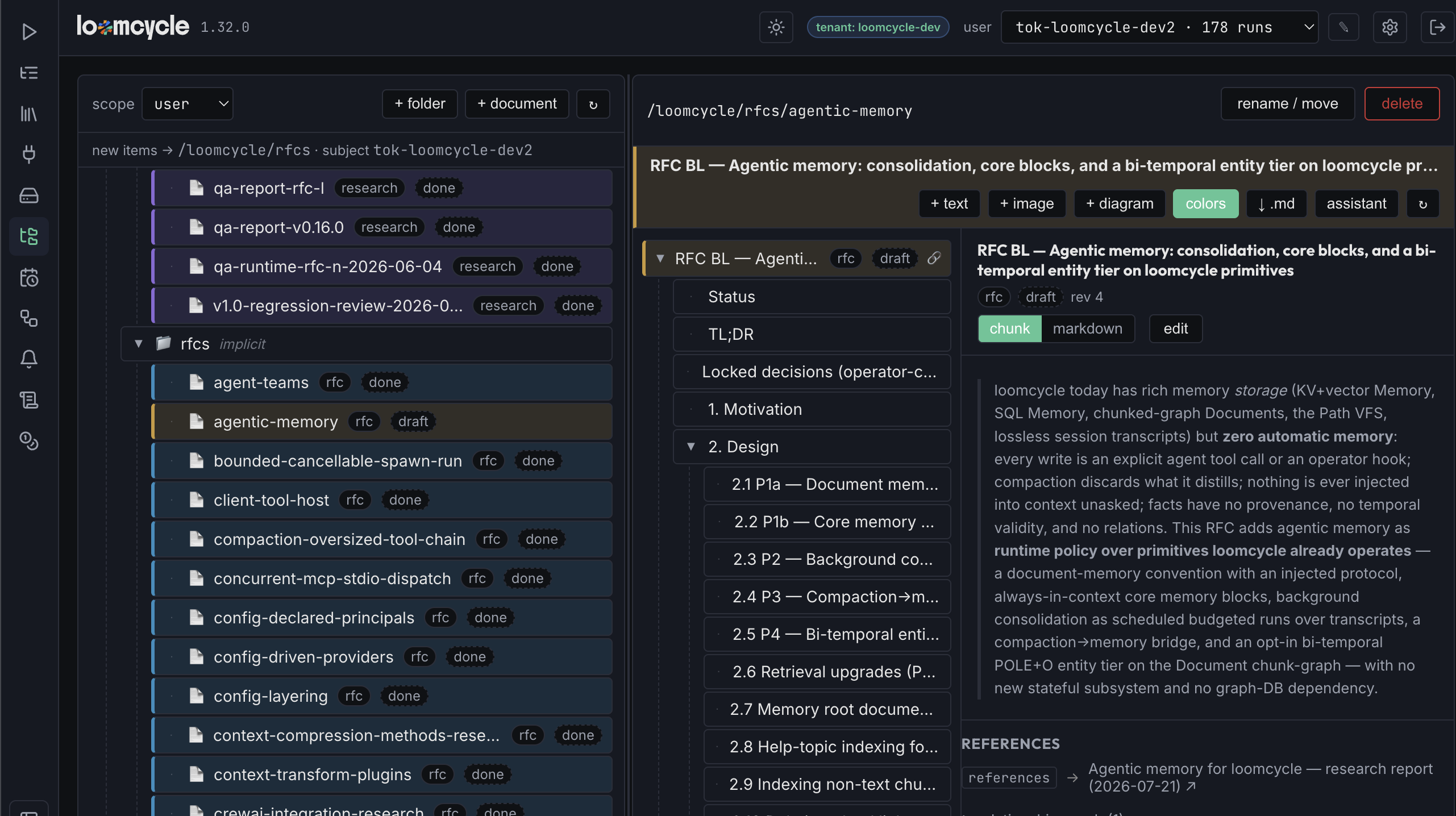
Two additive backend ops feed this. get_document now also returns the root chunk's type, status, and color settings, so the tree can color a document row without a follow-up call. And a new documents_summary op returns type, status, and color for a set of document IDs and/or a Path subtree in one batched query: unknown IDs skipped opaquely, IN (...) queries under the hood. The Path tree colors rows without an N+1 fan-out.
P4: cross-reference links and a relationship graph
Cross-reference edges between chunks (including cross-document) have existed since the Document primitive shipped, but they were invisible in the viewer. Only SQL could see them. That is fixed too.
On a linked chunk tile, a 🔗 badge indicates the chunk has outgoing or incoming edges. Click the tile and its References list appears: same-document targets navigate directly, cross-document targets are labeled ↗. And a collapsible whole-document Mermaid relationship graph renders the chunk-to-chunk edge structure at a glance, capped at the first 24 edges with a show all expand.
One new backend op does the work: get_edges returns every edge with an endpoint in the document (outgoing, incoming, cross-document) enriched via a self-join on chunks with each endpoint's title, type, status, and document_id, in one call. It replaces the raw-SQL escape hatch operators had been using. The P2 Mermaid renderer was extracted into a shared components/Mermaid.tsx, reused by both the Markdown fence and the relationship graph.
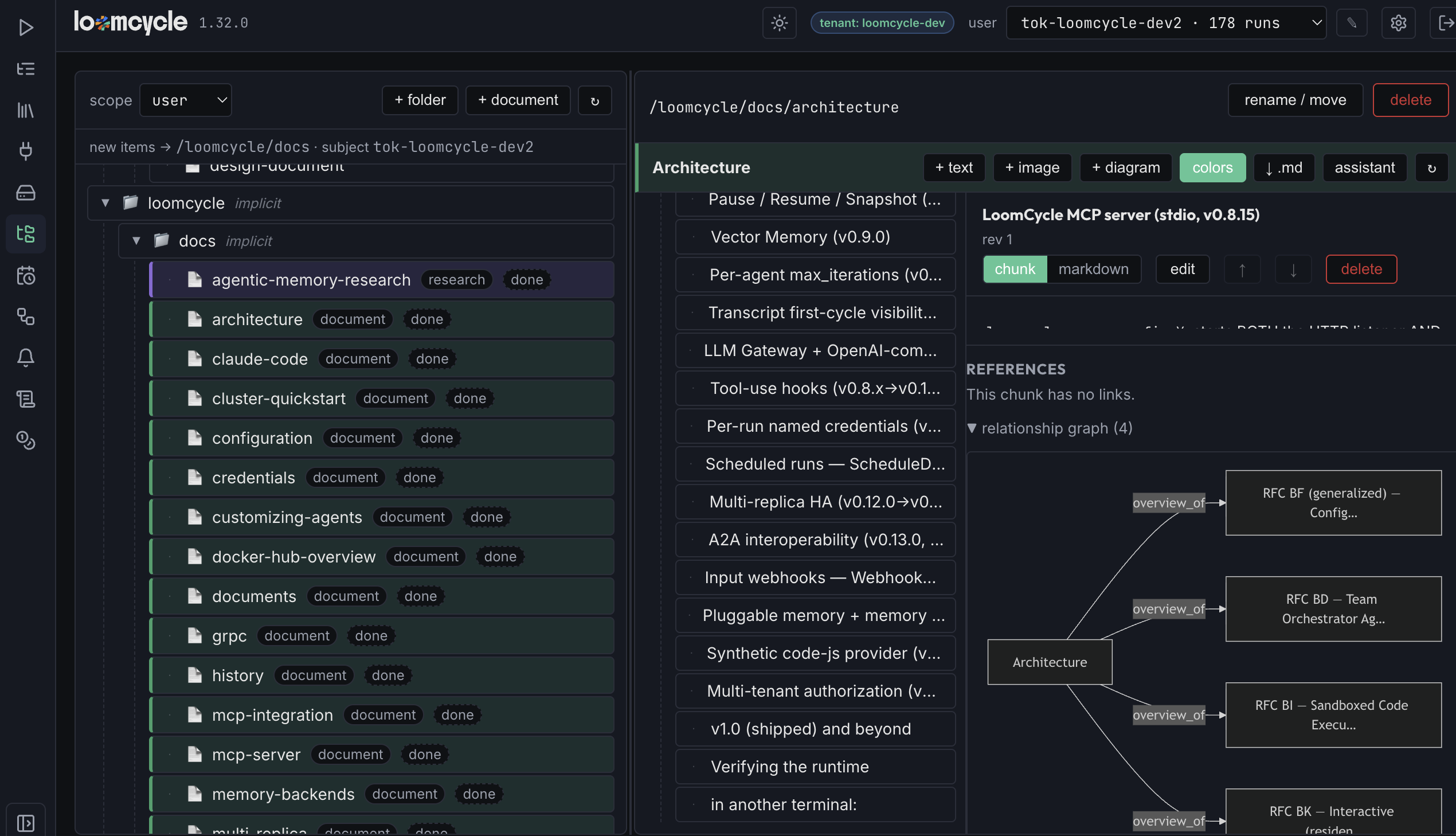
get_edges call; the Mermaid rendering reuses the shared strict-mode renderer.v1.29.1: the doc-colorizer bundle
v1.29.0 gave a single document its own color scheme. Applying a shared palette across a whole subtree of documents was still a per-document chore: open each root chunk, edit its fields, save. A script would be right. An LLM agent would be overkill. The natural fit is the code-js provider (RFC J): operator JavaScript on the loomcycle substrate, no LLM call.
v1.29.1 ships a doc-colorizer bundle that does exactly this. The doc/colorizer agent walks a Path subtree (default /loomcycle/rfcs, walked recursively), fetches each document's root chunk, merges the requested color fields, and calls update_chunk with one revision-conflict retry. Zero tokens. Deterministic. Idempotent. No hallucinated hex value.
Parameterized via the run prompt (JSON) or metadata: subtree, scope, color_enabled, color_scheme for a full palette override, and a dry_run flag that reports what would change without changing anything. Drivable by an operator spawn_run, the scheduler, a webhook, or an LLM parent's Agent.spawn. Selected via LOOMCYCLE_PRESETS=base,doc-colorizer; needs LOOMCYCLE_CODE_AGENTS_ENABLED=1 plus SQL Memory. Boot-fatal if code agents are disabled, so it is opt-in and never in the default preset stack.
3. RFC BO: images and diagrams as first-class chunks
A loomcycle Document was text-only. A chunk held Markdown plus typed fields; a diagram could live inline in a body only if you kept the Mermaid source in the Markdown fence; images could not exist at all. The v1.30.0 arc across four merges makes images and Mermaid diagrams first-class chunk types.
P1: the backend
Image bytes go in a new chunk_assets table in SQL Memory. sqlite gets BLOB, postgres gets BYTEA, picked per-tier by ensureSchema. This is the one non-portable column in the Document store and is worth calling out because it is the only place the two backends diverge.
Two new ops on the document tool. set_asset {id, media_type, data(base64), filename?} validates the media type against a whitelist (image/png, image/jpeg, image/gif, image/webp), validates the base64, checks the size cap, and upserts the asset row while marking the chunk type=image. get_asset returns only metadata (media type, filename, size, updated timestamp), never the bytes.
SVG is deliberately excluded from the whitelist. Script-in-SVG is a live XSS vector, and no matter how the viewer sanitizes on the way out, storing the bytes at all is a footgun. If someone needs vector graphics, Mermaid handles the diagram case, and other vector formats can be added later behind a proper isolation story.
A new route serves the bytes: GET /v1/_document/asset/{chunk_id}. Bearer-authed. Scope and tenant resolved from the principal, never the wire. Cross-scope reads fold to opaque 404, the same posture the History tool uses for by-id ops: IDs cannot be probed to learn what exists. The Content-Type is the stored whitelisted media type. X-Content-Type-Options: nosniff is set so a browser cannot content-sniff bytes into a different type.
A new environment cap: LOOMCYCLE_MAX_DOCUMENT_ASSET_BYTES, default 8 MiB. It bounds both the image size and the POST body. A useful side effect: the old 1 MiB substrate cap on the body forced large import_md documents to be split into multiple calls. Lifting the cap on this route lifts the constraint for document import too.
get_chunk gets an asset indicator flag so consumers know to fetch the binary separately. Delete cascades drop the asset row.
P2: the viewer renders both
A type=mermaid chunk renders as a diagram (the shared lazy renderer from RFC BN P2 is reused). A type=image chunk renders as an <img> element.
Rendering the image is subtly harder than it sounds. A bare <img src="/v1/_document/asset/..."> cannot carry a bearer token: the browser will not send one on a plain image request. The viewer instead fetches the binary with auth into a blob object URL, then sets <img src="blob:...">. The helper (documentAssetObjectUrl) is built from the Connection so it reuses cookie auth for the Web UI's same-origin path and the bearer for the standalone @loomcycle/explorer package.
Type icons on the tree: 🖼 for image chunks, 📊 for Mermaid chunks. Small thing, but it lets you see the shape of a document from the tree without opening chunks one at a time.
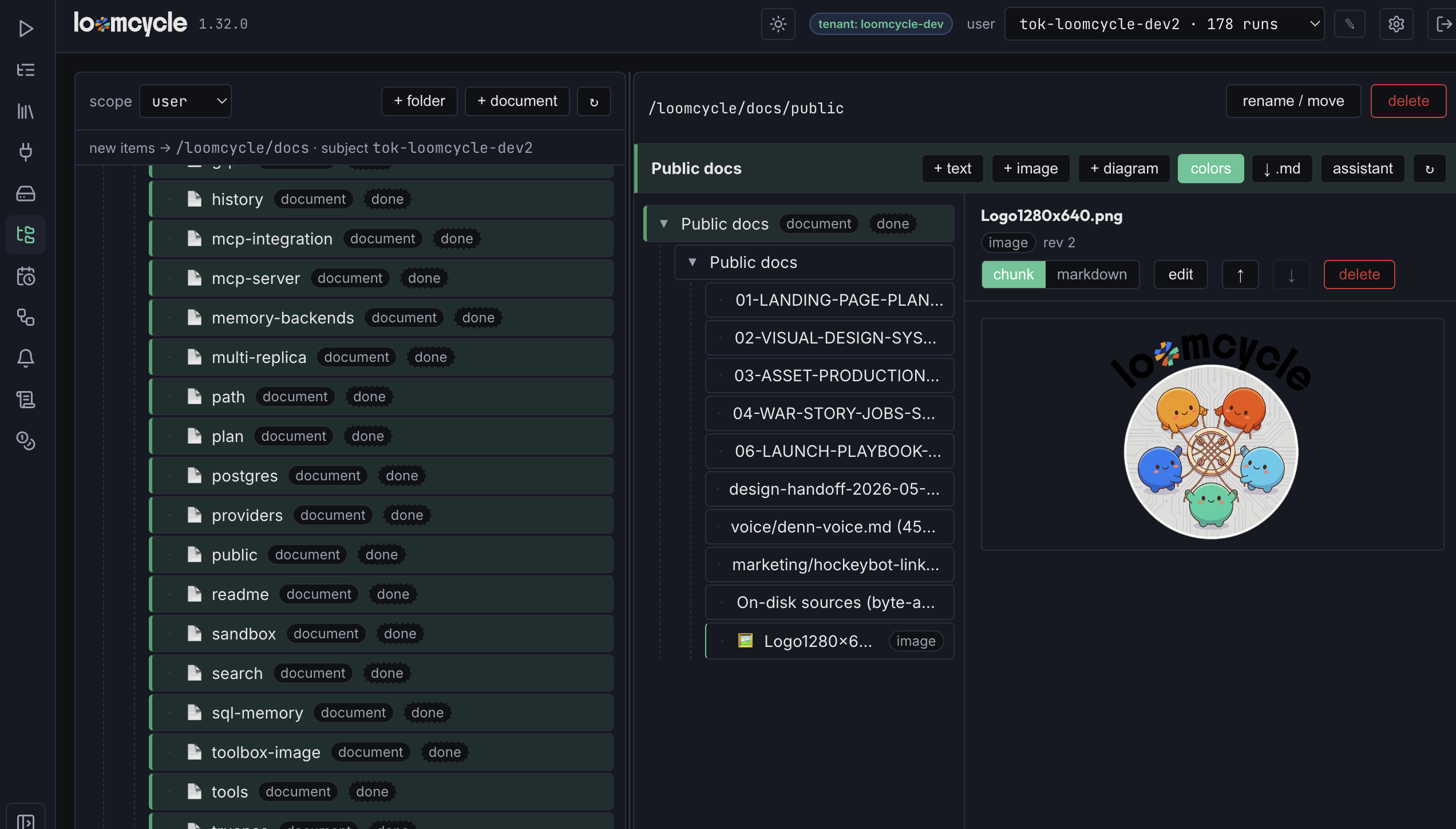
<img src>. Tree row shows the type icon 🖼 for images.P3: authoring images and diagrams in the browser
Three affordances shipped together.
A + image button uploads a file. A paste-anywhere handler catches a screenshot from the clipboard and creates a new image chunk with it. Both go through set_asset; the image is uploaded once and rendered from the same object URL.
A + diagram button creates a new type=mermaid chunk and opens the editor. The chunk editor gains a live Mermaid-source preview (debounced) for a diagram chunk, so you can type or paste Mermaid syntax and see the rendered diagram update alongside the source. On an image chunk, the editor shows a Replace image control.
No new UI framework, no rich-text mode. The same edit dialog with a preview pane.
P4: export and import round-trip
export_md now renders a Mermaid chunk as a fenced ```mermaid block and an image chunk as a self-contained  data-URL. So exporting a document produces a Markdown file that is complete on its own, with images inline. Copy-paste it into any Markdown viewer that renders data-URLs and everything is there.
import_md reconstructs both. Anchored detection means a text chunk with an inline Mermaid fence in its body is not reclassified as a diagram chunk; only a fence that stands as its own block gets promoted. Import works from a clean, metadata-free export too, which matters for documents authored by hand.
The TS adapter (@loomcycle/client) gains two helpers: documentAssetUrl returns the URL for a chunk's asset, and fetchDocumentAsset does the authenticated binary GET. Python stays where it is because it is gRPC-only and the binary asset GET is HTTP-only; a proto-side equivalent is deferred until there is a clear caller.
4. RFC BP: per-chunk edit controls
By the time RFC BO shipped, a chunk had a viewer, a Markdown renderer, a Mermaid renderer, an image renderer, a color scheme, and a cross-reference graph. The one thing you still could not do cleanly was rearrange chunks. Insert a new text chunk after a specific sibling. Move a chunk up or down within its level. Delete a chunk. All possible via the raw document tool and hand-picked position numbers; all annoying if you were doing anything more than the trivial case.
RFC BP adds three buttons and two backend ops.
Two backend ops that make the buttons possible
The old create_chunk took parent_id and position. To insert a new chunk between two existing siblings, you had to know the target sibling's position, know the parent's other siblings' positions, and pick a position number without a tie. If two siblings held positions 3 and 4, inserting after position 3 meant... what? 3.5? 3 with a shift? Neither shape was clean.
create_chunk gains after_id. Pass the sibling ID to insert after and the backend adopts that sibling's parent, inserts the new chunk at the sibling's position plus one, and shifts every later sibling by +1 in one transaction. The new chunk lands with no position tie. A missing or cross-document after_id errors out. If after_id is set, it overrides parent_id and position.
reorder_chunk is a new op: {id, direction: "up"|"down"}. Move a chunk within its level: swap with the neighbor in canonical (position, id) order, then renumber the whole sibling list to contiguous 0..n-1 in one transaction. That last part is the useful side effect: any pre-existing ties or gaps in the sibling list heal in the same transaction. A boundary case (already at top or bottom) or a sole child returns a no-op success.
Delete uses the existing delete_chunk, which cascades the subtree and refuses the document root. No new op needed for delete.
Both new ops are opt-in: the existing create_chunk and move_chunk default behavior is byte-unchanged. Every transport picks up the new ops through the existing /v1/_document passthrough and the MCP document tool and the gRPC passthrough; no new route, no per-op gating, no migration. Regression tests TestDocument_CreateChunkAfterID and TestDocument_ReorderChunk guard the correctness properties.
The existing move_chunk's pre-existing footguns are intentionally left untouched. Cross-parent moves that would create cycles or ties are still callable and still behave the same way. Fixing that is a separate change; RFC BP is scoped to the ops the viewer needs.
Three buttons in the viewer
+ text creates a text chunk after the selected chunk via after_id, then opens the chunk editor on the new chunk. That is the common create-a-new-paragraph case.
↑ and ↓ reorder via reorder_chunk. Enablement is computed client-side from the loaded sibling positions: ↑ is disabled if the chunk is first among siblings; ↓ is disabled if it is last; both are hidden on the document root. So the buttons never issue a call that will no-op.
Delete is a danger-colored button with a confirm modal. On confirm it calls delete_chunk, then selects the parent so the viewer's focus does not disappear. Hidden on the root.
The chunk-vs-Markdown view toggle is unchanged: the same viewer surface, three more controls.
5. What does this add up to?
Individually these are per-feature reads: a color scheme, a Mermaid renderer, a plus-text button. Together they change what the Document store is for.
Before RFC BN + BO + BP, the Document store was a good place to persist chunked knowledge that agents could operate on. It was not a good place to read that knowledge as a person; the viewer was an editor, not a reader. Now it is both. The store holds the RFCs, the guides, the research notes; the viewer renders them with tables and diagrams and images; a color scheme lets a large corpus be scanned at a glance; the relationship graph shows how chunks link across documents; per-chunk controls make it fast to rearrange as you go.
The composition also matters. The color scheme in RFC BN is stored in root-chunk fields, which the doc-colorizer code-js agent in v1.29.1 can walk in bulk. The Mermaid renderer in RFC BN P2 is the same one RFC BO P2 reuses for diagram chunks. The get_edges op that feeds the relationship graph is the same shape a Team-Orchestrator agent can call to reason about relations. Each piece composes with the substrate around it; nothing is a UI-only special case.
Each piece composes with the substrate around it. Nothing is a UI-only special case.
6. What's next
Three follow-ups are queued in the RFC BN / BO / BP lines.
Rich-text editing in the chunk editor, beyond the Markdown text area. The current editor is a text area with a preview; a WYSIWYG option is a candidate for RFC BQ if there is real pull.
Additional media types. SVG needs an isolation story before it can be added. PDF as a chunk type is a candidate if there is a clear use case; today, PDF is handled at the attachment layer for chat inputs.
Python asset helpers. The gRPC surface handles asset metadata already, but a Python helper for fetching the binary bytes over the HTTP route (mirroring the TS fetchDocumentAsset) is a small addition when the first Python caller asks for it.
Companion reading: warm containers, cloneable agents, resident sub-agents for the RFC BJ / BK / BI P2 arc that shipped just before this one; the History tool for the by-id fold posture the asset route reuses; agent teams for the Mermaid renderer shared with the teams board; and docs/DOCUMENTS.md for the Document primitive's operator reference including the new asset route and the color-scheme fields.
A store that holds knowledge and a viewer that renders it are the same thing seen from two sides: the writer and the reader. For a long time only one side worked, and the knowledge piled up without quite becoming the project's reading surface. Three RFCs made the other side catch up.
You can now scan an RFC corpus by color, follow a cross-reference edge with a click, read a diagram as a diagram, see a logo rendered inline, and insert a new chunk by button instead of by position number. The store is the same store it always was. The reach of what you can see with it widened.